Santa Tracker Ornament
 Bonnie - CBco Designs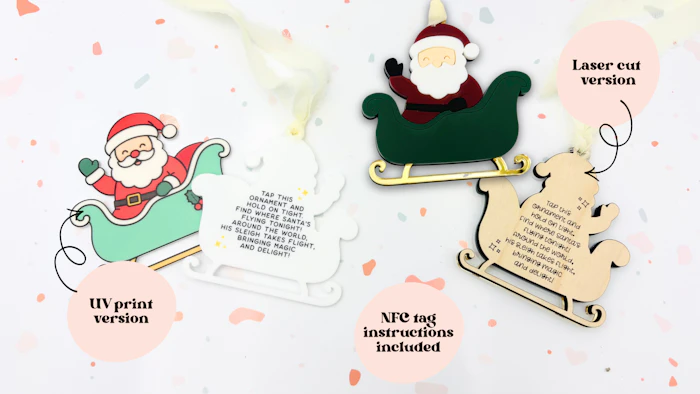
Add a little Christmas magic with this NFC-Enabled Santa Tracker file! Designed to connect to a Santa tracking website with just a tap of a phone, it’s a fun interactive piece to bring out year after year.
Available as a laser cut version or laser cut + UV printed version. NFC setup instructions are included below.
Laser cut version:
Laser cut/UV print version:
Materials for the laser cut version:
1/8" acrylic in White, Peach Chiffon, Wine, Pine, Black and Gold Mirror from COHn Acrylics - get 15% off your first order with coupon code BONNIE15
1/4" Maple from Columbia Forest Products at Home Depot. 1/8" in your chosen wood (or acrylic!) would also work
3m 367mp adhesive from COHn Acrylics - get 15% off your first order with coupon code BONNIE15
Cream chiffon ribbon from Amazon
*I may earn a small affiliate commission from some of these links at no extra charge to you
Materials for the UV print version:
I use the EufyMake E1 - get 8% off your own printer here
1/8" acrylic in White from COHn Acrylics - get 15% off your first order with coupon code BONNIE15
3m 367mp adhesive from COHn Acrylics - get 15% off your first order with coupon code BONNIE15
EufyMake settings:
Material: Acrylic
Quality: Standard
Ink Mode: CMYK x1
NFC instructions:
You will need an NFC-enabled phone to program the tag, AND your customer will need one to read (tap) it. HERE is a list of NFC enabled phones. You may want to use this link in your product listing so that your customer can ensure they will be able to use the ornament before purchasing. Most smartphones from the last 10+ years are capable.
To program the tag, you will need an NFC writing app on your phone or tablet. I use one called NFC tools (for iPhone). It's free.
You will "write" the tag with the URL(website) of your choice. When the customer taps the tag, that website will open.
I love the Google Santa tracker site, because there are also games for kids to play before Christmas eve. You could also link to the NORAD tracker.
Make sure you program your tag AND test it (by tapping it when on your phone's home screen) before assembling your ornament.
The tag sticks to the centre of the ornament, and gets sandwiched between the two layers. Try not to get glue on it (I recommend using 3m 367mp to assemble the ornament)
You may also like: