Make cute photo keychains - SVG + PDF Generator for Laser + UV Print
OCT 15, 2026
Here's the latest with Cuttle.
- New template: Make cute photo keychains with Laser + UV Print
- Video: How to get perfect alignment with eufyMake
- Editor feature: Modify Color
Make cute photo keychains with Laser + UV Print

Our latest template lets you upload any photo or logo with a transparent background and it generates an SVG file and PDF file for a print & cut workflow.
- Automatically adds a keychain hole (you can set the hole size)
- Move the keychain hole wherever you like
- Adds a configurable offset around the photo or logo
- Sizes everything automatically
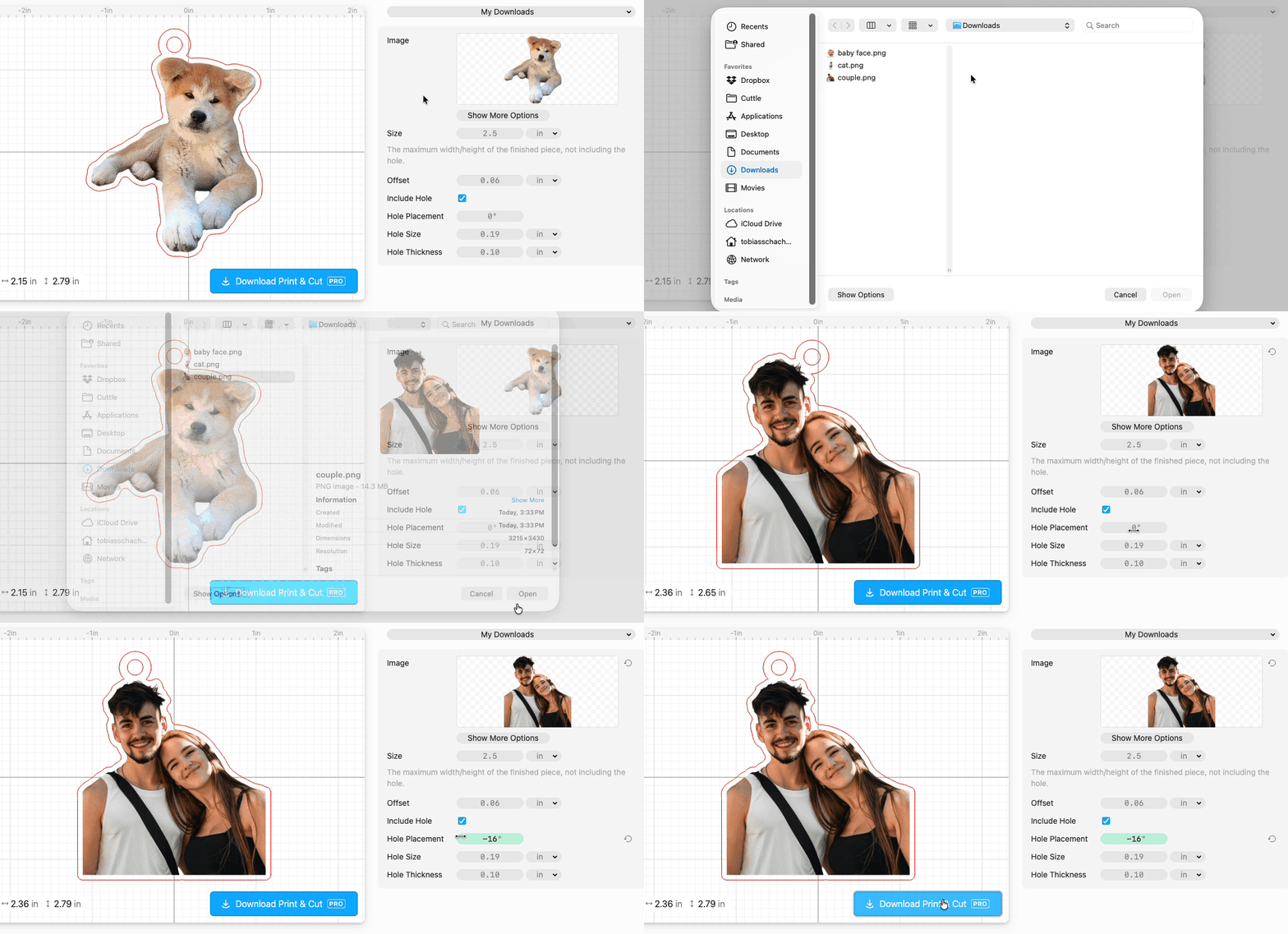
All you need is a photo or logo as a PNG file with its background removed. The template page has some instructions for how to remove the background on a photo.
The template instantly generates a zip file with an SVG cut file and a PDF print file. Cut the SVG from clear cast acrylic (or whatever material you like), then print the PDF onto it with a UV printer.

How to get perfect alignment with eufyMake

If you have a eufyMake UV Printer, the camera alignment works well but it’s not perfect.
Here’s a trick to get perfect alignment for Print & Cut jobs with your laser cutter and eufyMake.
Thank you to Cuttle Creators Bonnie and Alysha for describing this technique to us. The video linked above is from Bonnie’s Instagram.
Editor feature: Modify Color

In the Cuttle Editor, we added a new advanced modifier called Modify Color. Federico recorded a tutorial video on our YouTube explaining how it works and places where it’s useful. It lets you apply a modifier selectively, only to shapes of a certain color.
Other Improvements and Fixes 🐞
- You can now add a description to your Profile page — edit yours in Account Settings
- On 3D Printing templates, you can now change the colors on all the layers directly on the template
- Improved the file size and compatibility of exported 3MF files
- Improved performance for Boolean Union and Weld And Score
- Improved performance for snapping in the Editor
- Improved the appearance of hidden shapes when you select or hover them
- When you select multiple shapes, the visibility, guide, and locking toggles now toggle all the shapes in your selection
- Fixed bugs with Remove Overlaps
- Fixed a bug with Google Sign-In on some school firewalls

Toby Schachman