Pumpkin with Inner Image
 Deanna's Wooden Art
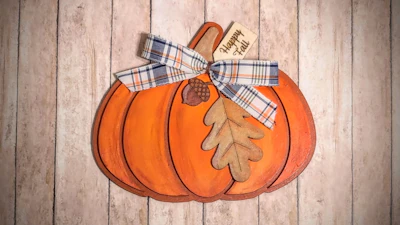
This 3D Illusion Fall Wall Hanging or Shelf Sitter, appears to have a Scene inside a Pumpkin. Each piece of the pumpkin is cut separately and shaped and sanded as part of the 3D effect. An original and unique scene can be printed on cardstock and glued to the backer, sublimated onto the backer, or printed directly on the backer itself.
Directions:
For Hanging Holes check the "Add Holes" box
Red=Cut, Blue=Score, Pink=Image Template
After cutting the top layer of wood, round over all the edges using a file, Dremel sanding bit, or other tool. Paint each piece and shade the edges.
Apply scene to inner scored area of backer, using method of your choice. Mod Podge and printed paper cardstock (used in Photo Example), sublimation, or print directly onto the backer itself with a UV Printer.
Glue the Top Pieces together on top of the backer with scene, lining up to the outside edge of the backer.
To use Scrapbook or Digital Paper: Download the Cuttle SVG File and Cut and Score the Wood with your Laser. Next, Cut your Desired Image from Paper on your Laser, Cutting Machine (Cricut, Silhouette, xTool M1, M2), or by hand. using the PINK lined Template in the Downloaded Pattern. (The template allows for a little overlap which is hidden by the top layer of wood). Once cut, Glue the Paper to the Backer with Mod Podge, using the score lines to line up the Paper.
Try this template next:

Visit Deanna's Wooden Art for More Templates HERE